Hello everybody...I have re-surfaced from the wedding week! My daughter got married last week and hence no quilting was done obviously. It's been busy but we did have a wonderful day. Everything came miraculously together, the weather was great, we had great food and everybody had a lot of fun.
Currently looking after my daughter's cats as they have gone on a little honey moon.
While I did not quilt anything, I was not idle. In the evenings I finally spent some time fixing up my wholecloth design. This coincided with me getting a new app for the Ipad called Affinity Designer 2. If you followed my blog for a while you would know that I love to play around with designing in general. I just recently did my Mini Wholecloth design on the Ipad using 'Procreate'.
It took me some time but I was able to work out how to get the drawing to scale so that I could print it off at the right size. This was no easy undertaking as I had to convert pixels to inches, set my grid behind it up in the proper way and be very precise in my drawing. I do like the program and feel quite comfortable with it and it has a lot of very useful features for quilters. I often do little drawings for some of my workshops on there.
The main difference between the two programs is that Procreate is not a vector program. Procreate is great for the Ipad if you want to do some basic drawing, sketching and painting. It is easy to learn and has a lot of features that I really like and find useful for designing.
However what I do miss is the ability to clean up my strokes, e.g. like in this little picture
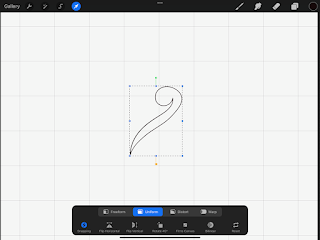
I can draw a shape quite easily with the Apple pencil, select it, make it bigger or smaller and as I found out put this little drawing into inches. What is missing though is the adjustment nodes to clean up your strokes. While I can set my brush up to work as streamlined as possible, I do find it annoying when I do make a wobble in just the last part which means I have to do it again if I want to use it for a diagram in one of the workshops. It is possible, of course, to be super careful and deliberate but I find that a bit of a hassle. For wholecloth design there is no way I can draw all my feathers the same in terms of angle and width/length etc. While that is ok for a smaller piece like the Mini Wholecloth I did above, this would be impossible to achieve on a bigger scale consistently. For the Mini Wholecloth above, I drew sections of the design on paper, then took a photo of it and imported it into the Procreate program. Then, very carefully, I traced the drawing. This was quite work intensive and at times frustrating (particularly after several cups of coffee), however worked out well in the end for this little piece. I traced 1 heart, 1 frame and 1 feather spray, so not too much at all. Once I had all that in the program I basically used copy and paste to make up the design. What though if I wanted to do a bigger design? I certainly could not imagine tracing an entire feather border...
So, I bought the Affinity Designer 2 App for the Ipad. This is a vector based program, very much like the the way Adobe Illustrator works. So, now I have some nodes that can be adjusted
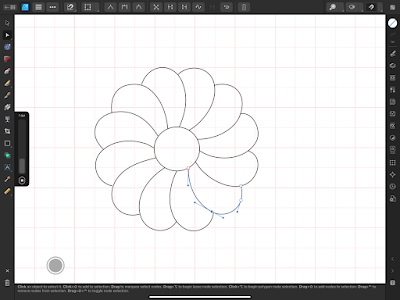
If I wobble or do not end up exactly where I want to be I can adjust the shape after I have drawn it. I used to use Ipad Graphics, an older program in the past for this but with the new updates this has stopped to work properly. So, I set out to test out the ease of the new App. Don't know about you but I am not one for reading manuals for hours...to me a program has to be intuitive and easy to learn. Affinity is definitely more complex than Procreate...there are things in there I do not even understand the English words that they are using. For a couple of days, I could not find the eraser, so in the end I did need to look at the manual. Their layer system also is somewhat way more complex and I struggled a bit with that. Still need to find something where you can name your layers as I had problems finding where I was at at times. If I could label the layers that might make that easier. Mind you, my test project was a wholecloth that I had drawn some years ago which needed sorting out in terms of size and also changes in design choices,
The settings were easy to change to inches and I was able to put a half inch grid behind it, so I could orient myself in terms of size when drawing individual shapes. I might have aimed a bit high as the wholecloth design came out to 36in.
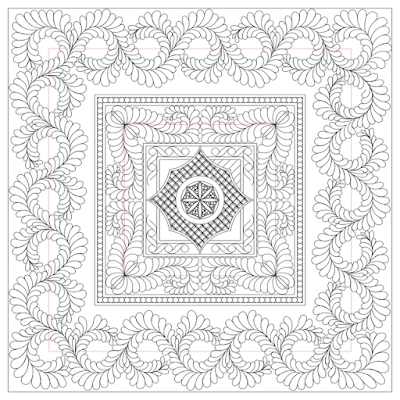
I went frame by frame, deciding on the space available, changed it a couple of times, added bitses I might use and worked out the middle section (minor alterations may need to be done...this is by no means finished). Found that the ability to work in inches and seeing what this looked like in terms of spacing extremely helpful. My feather arrangement in the centre was relatively easy to execute. I did one drawing, cleaned it up via the nodes until I was happy with it and then copied and pasted it around the centre motif. That worked really well. Then decided on the Amish feathers...now that became a bit of a nightmare. Made several mistakes in there in terms of how to quilt them...it's been over a year since I practiced this, however, my spacing is spot on, sort of. I should have lowered this a bit towards the frame in the middle, but lost the plot a bit in terms of sizing altogether at that stage. Funny enough with these Amish feathers, I can quilt them better than I can draw them.
The next day I practised sewing those feathers and realised that I need to follow how I normally quilt my feathers in terms of size and shape, so there would have to be an adjustment made on this image. This outer border was not easy. I drew two circles of feathers freehand, cleaned it up, then copied this to make a row. The corners were a bit of a hit and miss as they were slightly different. So, my copying and pasting created a lot of inaccuracies, however after a days of drawing, I just wanted to see what that looked like. If I wanted to produce a copy I could print from, I would have had to be more careful with every single circle using a combination of freehand drawing and copying to make this into a printable copy. However, patience had left me by then and I struggled to find the layers of individual shapes. The whole thing had just gotten too big.
All in all though, not a bad effort...it did clarify the dimensions perfectly for me, just need to do a few adjustments and get my head around the Amish feathers a bit more and we are ready to draw this out.
Incidentally today, I came across another feature...the slice
Only exported an exact quarter of the picture. If my Amish feathers were better, this would be perfect for printing. I might actually be able use the inner feathers and frames though as they were spot on. So, in summary, Procreate is great to get a draft of your design, try out different design ideas and as I found out you definitely can do some smaller, less involved drawings with some accuracy. However Affinity 2 is the program I would use if I wanted to create a precise wholecloth drawing that I could use to trace directly onto the fabric.
Great exercise and lots to learn.


.jpeg)


